> ## Documentation Index
> Fetch the complete documentation index at: https://docs.agentaos.ai/llms.txt
> Use this file to discover all available pages before exploring further.
# For Businesses
> Activate your EUR account as a company. Plan around 20 to 30 minutes; approval usually within 2 to 5 business days.
# Activate your business EUR account
A real European IBAN in your company's name, linked to your AgentaOS wallet.
Plan around **20 to 30 minutes** the first time. Approval usually arrives within **2 to 5 business days**.
## Before you start
* **Company registration documents**: proof of legal name, registered address, registration number, and registration date.
* **Beneficial ownership document**: shows everyone who owns 25% or more.
* **Power of attorney or authorisation**: proves the person opening the account is allowed to act for the company.
* **Photo ID for the representative**: passport, national ID card, or residence permit. Must be valid.
* **Personal details of all directors and 25%+ owners**: full name, residential address, nationality, date of birth.
## Eligibility
Some sectors and structures cannot be onboarded. Check these before you start so you don't waste 30 minutes.
* Gambling, adult entertainment
* Arms, dual-use goods, exotic animal trade, diamonds
* Unregulated pharmaceuticals or supplements
* Anonymous crypto services, unlicensed FX, binary options
* Unlicensed money remittance, hawala
* Pyramid or multi-level-marketing schemes
* Counterfeit goods or piracy
* Shell companies or offshore banks
* Nominee shareholders or bearer shares
* Entities with no legal personality
* Cash-only funded remittance entities
## Step-by-step
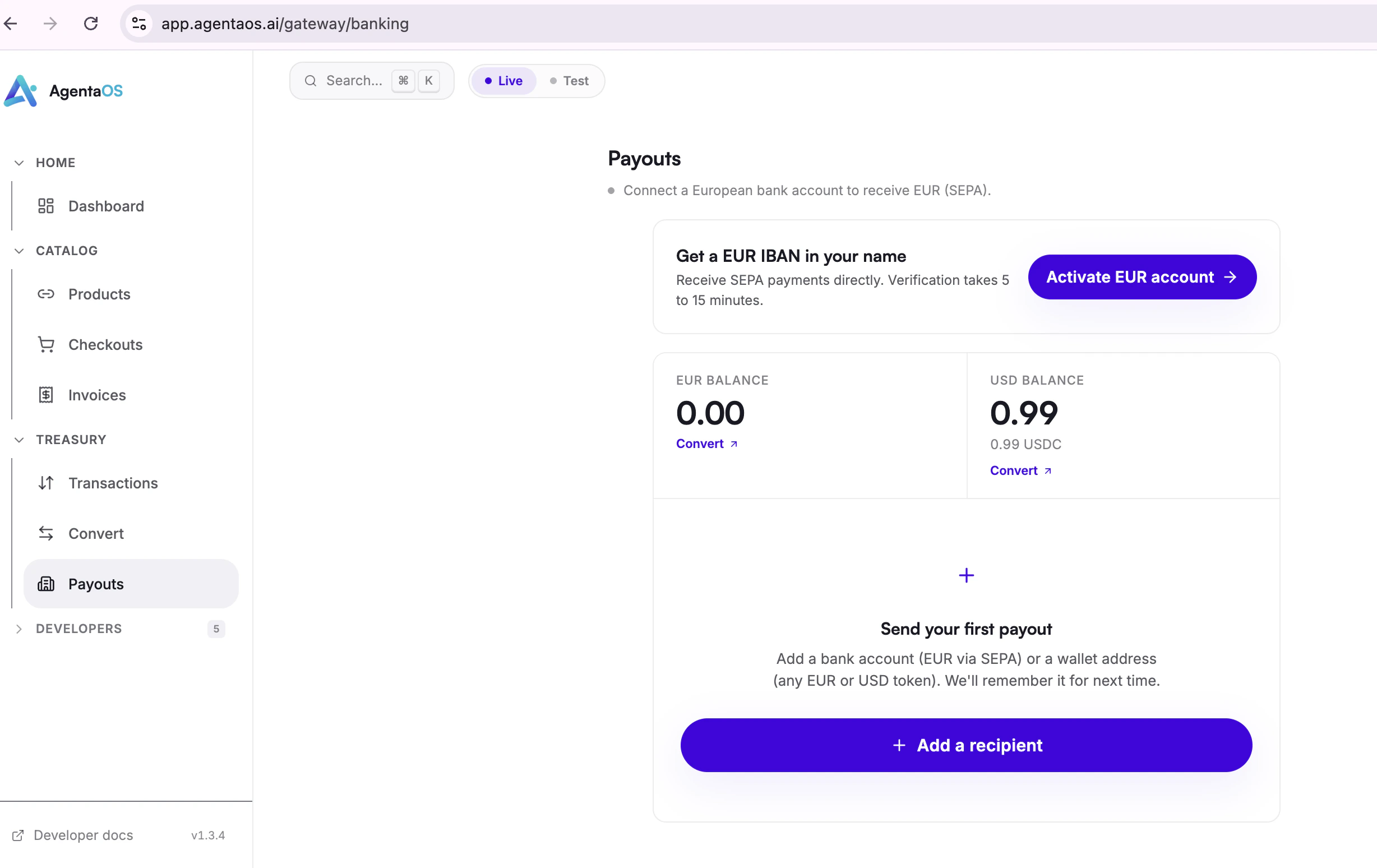
Open **Payouts** from the sidebar and click **Activate EUR account**.
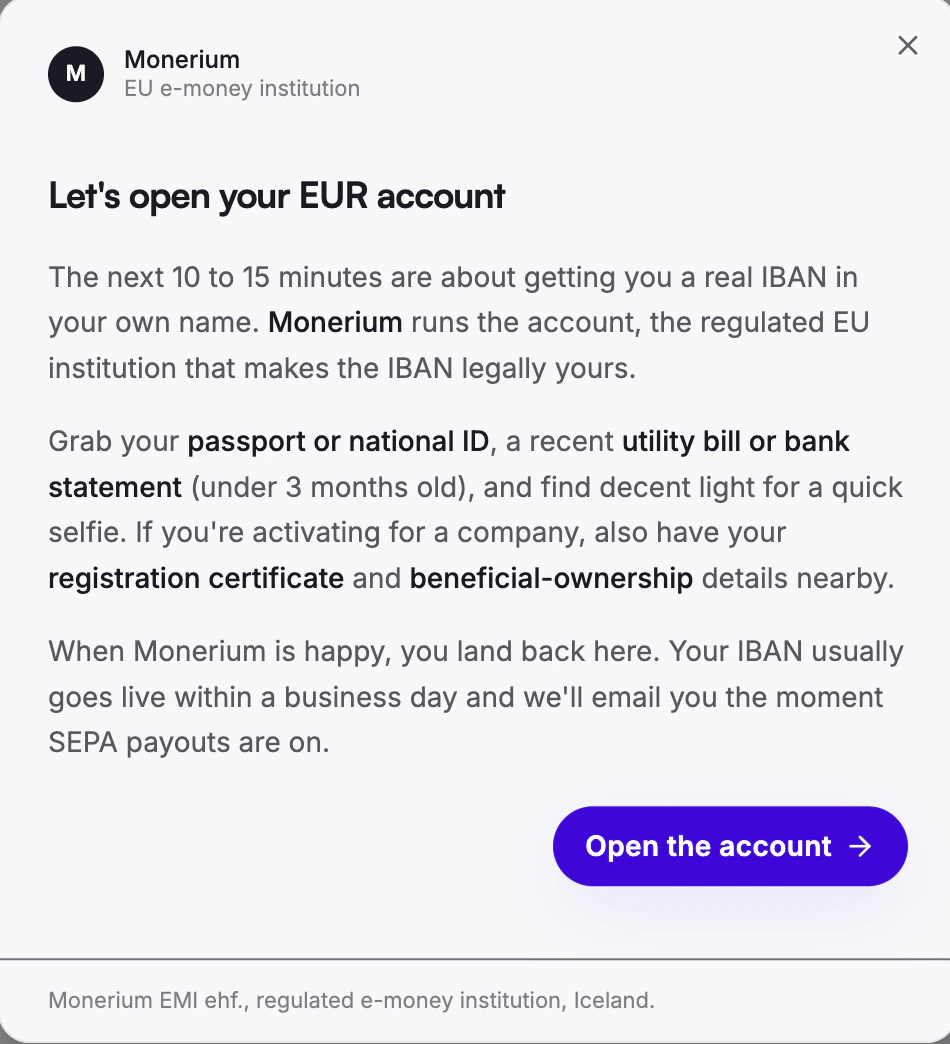
 A short consent screen explains what comes next. Click **Open the account**.
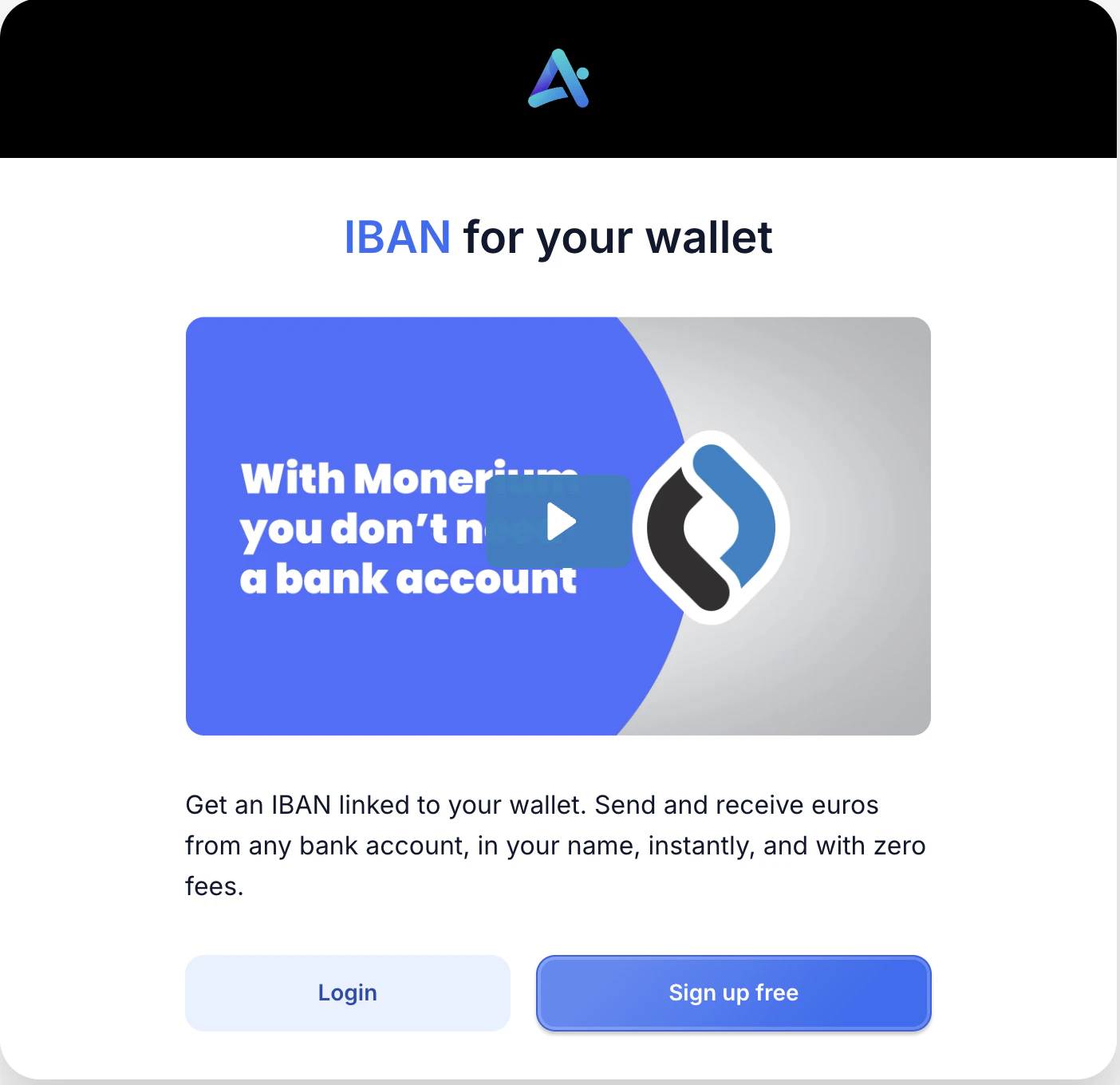
 First time? Click **Sign up free**. Already have an account? Choose **Login**.
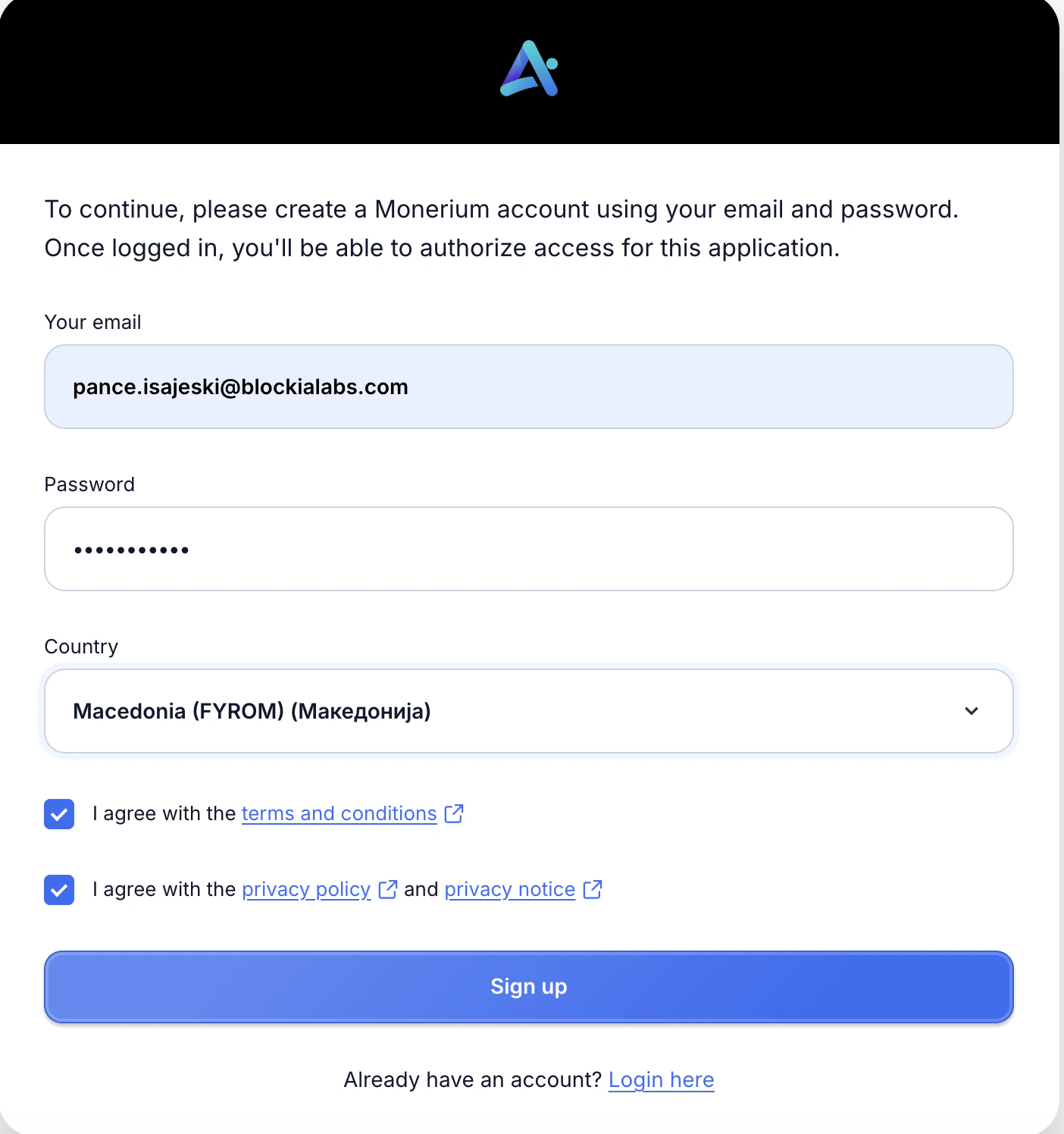
 Enter the **email** you want approval notifications sent to, choose a **password**, and pick the **country of incorporation**. Tick both agreement boxes and click **Sign up**.
**Use the same email you used for your AgentaOS account.** It keeps everything linked under one identity and makes future sign-ins simpler. Approval status, requests for clarifications, and your IBAN details all arrive there.
Enter the **email** you want approval notifications sent to, choose a **password**, and pick the **country of incorporation**. Tick both agreement boxes and click **Sign up**.
**Use the same email you used for your AgentaOS account.** It keeps everything linked under one identity and makes future sign-ins simpler. Approval status, requests for clarifications, and your IBAN details all arrive there.
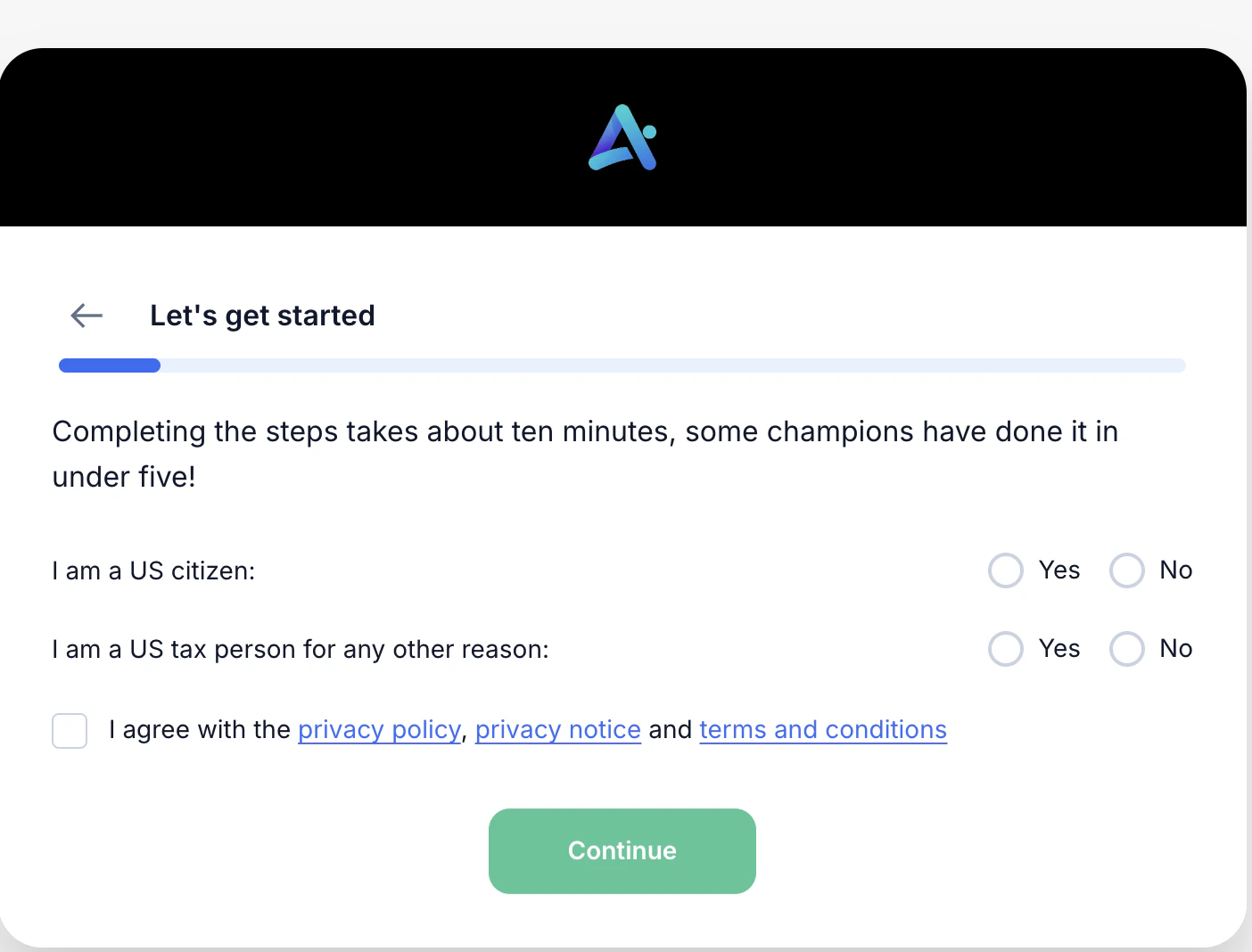
 A short welcome screen kicks off the document check. Answer a couple of quick yes-or-no questions, tick the agreement box, and click **Continue**.
From here you'll add the company details, upload the registration documents, list the people connected to the company, and answer the business-profile questions.
A short welcome screen kicks off the document check. Answer a couple of quick yes-or-no questions, tick the agreement box, and click **Continue**.
From here you'll add the company details, upload the registration documents, list the people connected to the company, and answer the business-profile questions.
 Fill in the company information **exactly** as it appears on official records:
* Legal name
* Registration number
* Registered address (street, postal code, city, state or county)
* Country of incorporation
* Date of incorporation
* VAT number and website if you have them
Mismatches between what you type and what's on the registration document are the single biggest source of resubmission requests. Copy carefully from the official extract.
Six documents in total. Many countries combine several of these into one official extract, so the same PDF can often be used for multiple slots.
| # | Document | Notes |
| - | ------------------------------ | ----------------------------------------------------------- |
| 1 | Proof of legal name | Registration extract or certificate of incorporation |
| 2 | Proof of registered address | Usually on the same extract |
| 3 | Proof of registration number | Usually on the same extract |
| 4 | Proof of date of registration | Usually on the same extract |
| 5 | Beneficial ownership statement | Names everyone holding 25% or more |
| 6 | Power of attorney | Authorisation for the representative to act for the company |
**English versions are recommended but not mandatory.** Official documents in your local language are accepted. If a document is in a script that's unfamiliar to most reviewers (for example, non-Latin scripts), a plain English translation alongside the original speeds things up but isn't a hard requirement.
Add details for everyone in the roles below.
The person filling in the application. Photo ID required (passport, national ID, or residence permit).
Everyone with power of procuration. Personal details only, no photo ID needed.
Everyone holding 25% or more. Personal details only, no photo ID needed. Ownership percentage required.
First and last name, residential address, postal code, city, country, nationality, date of birth.
A single person can fill more than one role. If the founder is the representative, a director, and a 100% owner, they appear three times with the same details.
A short questionnaire about what the business does and how money flows through it.
* **Service description**: one to two sentences in plain English.
* **Legal form**: limited company, partnership, sole trader, non-profit, etc.
* **Purpose of the account**: collect customer payments, pay suppliers, hold balances.
* **Main activity**: pick the closest category (software, e-commerce, marketplace, professional services).
* **Origin of funds**: revenue and operations, profit and dividends, investor capital.
* **Expected monthly turnover**: under €100k, €100k-€250k, or over €250k.
* **Expected monthly transaction count**: under 100, 100-250, or over 250.
Estimates are fine. Don't overthink the numbers. If you're early-stage, your honest forecast is better than zero.
A small number of profiles need an extra source-of-funds document. This usually only applies if:
* The company is incorporated in a restricted country.
* A director or beneficial owner is a politically exposed person.
If you fall into one of these, expect to upload bank statements, recent audited accounts, or an investor term sheet.
## Tips to avoid delays
The most common rejection cause. Copy directly from the official extract.
Every individual with 25% or more must be declared. If the cap table goes through holding companies, you must declare the natural persons behind those holdings.
The authorisation document has to name the person submitting the application. If you delegate, update the authorisation first.
Registration extracts are usually fine up to 3 to 6 months old. Older extracts will be rejected.
If any director or 25%+ owner has held a senior public role recently, attach a source-of-funds document at submission. Adding it later restarts the review clock.
"Tech company" is too broad. Say what the product is and who pays for it.
## What happens next
Most business reviews finish within 2 to 5 business days. Once approved, your company's EUR IBAN appears on your **Payouts** page and SEPA transfers start landing in your AgentaOS account.
Reach out at [contact@agentaos.ai](mailto:contact@agentaos.ai)
Fill in the company information **exactly** as it appears on official records:
* Legal name
* Registration number
* Registered address (street, postal code, city, state or county)
* Country of incorporation
* Date of incorporation
* VAT number and website if you have them
Mismatches between what you type and what's on the registration document are the single biggest source of resubmission requests. Copy carefully from the official extract.
Six documents in total. Many countries combine several of these into one official extract, so the same PDF can often be used for multiple slots.
| # | Document | Notes |
| - | ------------------------------ | ----------------------------------------------------------- |
| 1 | Proof of legal name | Registration extract or certificate of incorporation |
| 2 | Proof of registered address | Usually on the same extract |
| 3 | Proof of registration number | Usually on the same extract |
| 4 | Proof of date of registration | Usually on the same extract |
| 5 | Beneficial ownership statement | Names everyone holding 25% or more |
| 6 | Power of attorney | Authorisation for the representative to act for the company |
**English versions are recommended but not mandatory.** Official documents in your local language are accepted. If a document is in a script that's unfamiliar to most reviewers (for example, non-Latin scripts), a plain English translation alongside the original speeds things up but isn't a hard requirement.
Add details for everyone in the roles below.
The person filling in the application. Photo ID required (passport, national ID, or residence permit).
Everyone with power of procuration. Personal details only, no photo ID needed.
Everyone holding 25% or more. Personal details only, no photo ID needed. Ownership percentage required.
First and last name, residential address, postal code, city, country, nationality, date of birth.
A single person can fill more than one role. If the founder is the representative, a director, and a 100% owner, they appear three times with the same details.
A short questionnaire about what the business does and how money flows through it.
* **Service description**: one to two sentences in plain English.
* **Legal form**: limited company, partnership, sole trader, non-profit, etc.
* **Purpose of the account**: collect customer payments, pay suppliers, hold balances.
* **Main activity**: pick the closest category (software, e-commerce, marketplace, professional services).
* **Origin of funds**: revenue and operations, profit and dividends, investor capital.
* **Expected monthly turnover**: under €100k, €100k-€250k, or over €250k.
* **Expected monthly transaction count**: under 100, 100-250, or over 250.
Estimates are fine. Don't overthink the numbers. If you're early-stage, your honest forecast is better than zero.
A small number of profiles need an extra source-of-funds document. This usually only applies if:
* The company is incorporated in a restricted country.
* A director or beneficial owner is a politically exposed person.
If you fall into one of these, expect to upload bank statements, recent audited accounts, or an investor term sheet.
## Tips to avoid delays
The most common rejection cause. Copy directly from the official extract.
Every individual with 25% or more must be declared. If the cap table goes through holding companies, you must declare the natural persons behind those holdings.
The authorisation document has to name the person submitting the application. If you delegate, update the authorisation first.
Registration extracts are usually fine up to 3 to 6 months old. Older extracts will be rejected.
If any director or 25%+ owner has held a senior public role recently, attach a source-of-funds document at submission. Adding it later restarts the review clock.
"Tech company" is too broad. Say what the product is and who pays for it.
## What happens next
Most business reviews finish within 2 to 5 business days. Once approved, your company's EUR IBAN appears on your **Payouts** page and SEPA transfers start landing in your AgentaOS account.
Reach out at [contact@agentaos.ai](mailto:contact@agentaos.ai)